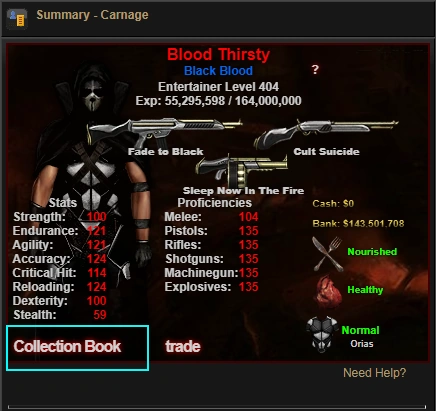
The Collection Book is a secondary storage system available at all public and personal outposts. It is intended as a way to exhibit one's collection of rarely used, non-transferable or collectible items, and free up Storage spaces for other purposes such as storing loot.
View Collection
A player's collection can be accessed by visiting their Character Profile page and pressing the Collection Book button.


The Pinned tab serves as the landing page, showcasing the items most treasured by its owner. From here, you can access tabs for various item categories in the game, such as weapons, armors, implants or clothing. Hovering over the items show their stats.
If you are the collection's owner, you can also enter the editing interface by clicking Edit Collection Book at the top-left of the screen.
Edit Collection
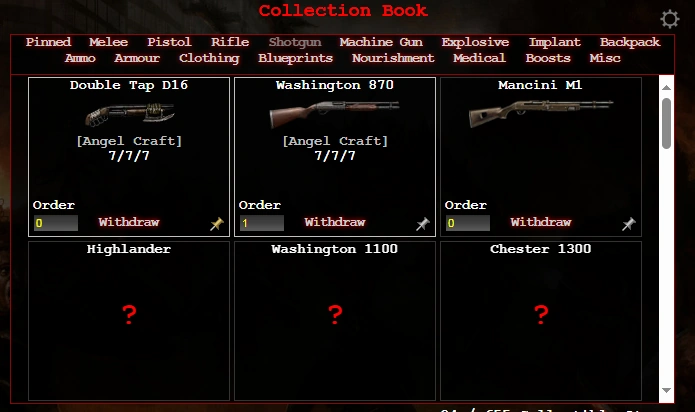
In the editing interface, you can:
- Deposit or withdraw items.
- View stats of all items, even those not added to the Collection.
- Reorder items by changing their Order property, with items with higher value appearing at the front. Order value must be greater than or equal to 0.
- Pin/unpin items. Pinned items get added to the Pinned tab, and also will appear above other items in their respective category tab.
Depositing/Withdrawing
- The Collection only accepts 1 instance of each item type. This is irrespective of characteristics like MC, renames, color or ammunition amount.
- Adding any item to the Collection is free.
- Withdrawing a transferable item incurs a charge of $15,000. Withdrawing a Non-Transferable item is free.